
The native database IDE
powered by AI
Query PostgreSQL, MySQL, SQLite, Redis, MongoDB, SQL Server, and ClickHouse from one fast, native app on macOS, Windows, and Linux. Built-in AI chat with Claude, GPT, Gemini, or local Ollama. MCP server and team tools in Pro.


Built for the way you actually work
Real screenshots from the shipping app — query editor, ER diagram, MCP server, and the audit log that comes with it.
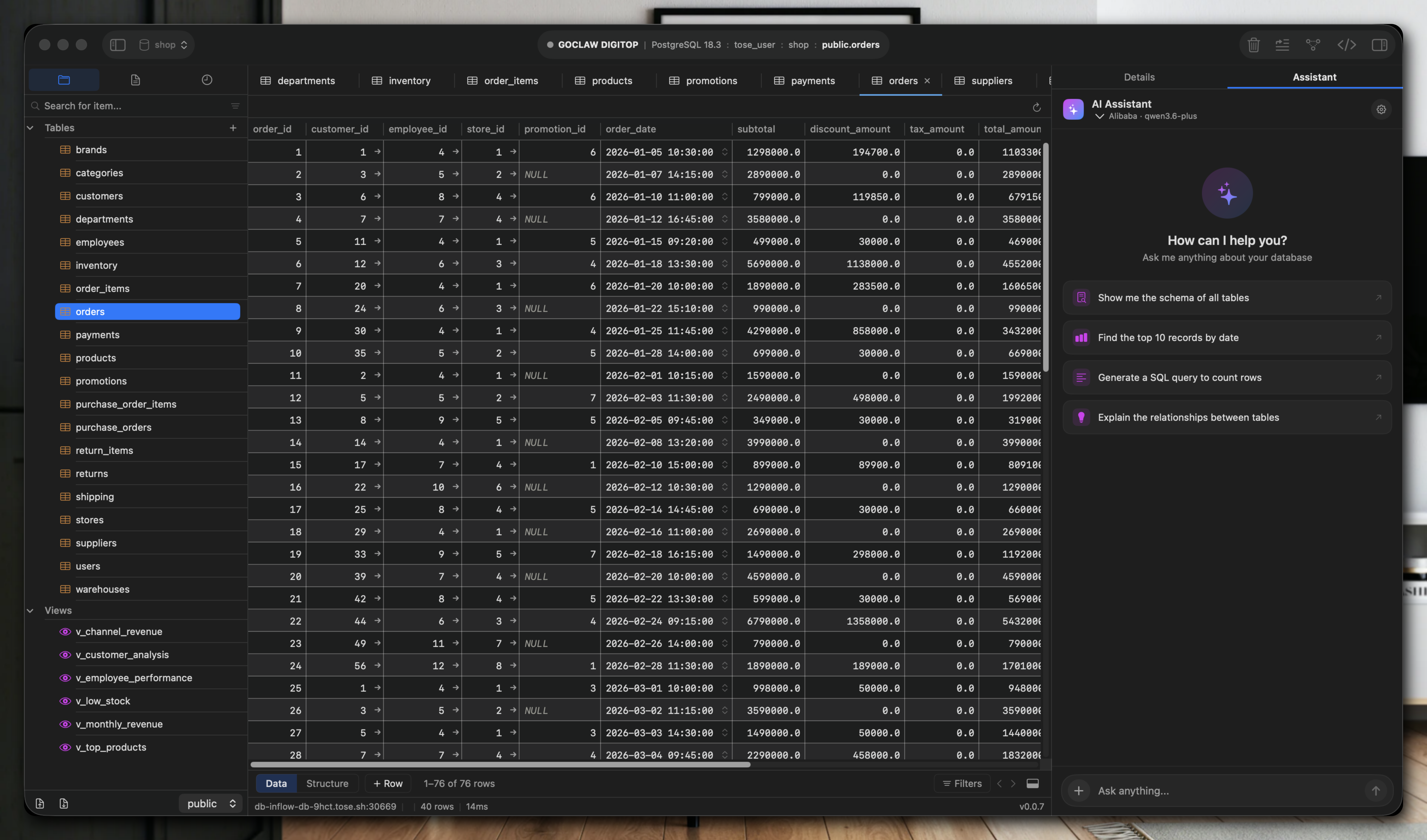
One window, every database
Multi-tab query editor, native data grid, sidebar of all your connections — and AI chat that understands your schema, all in a single native window.
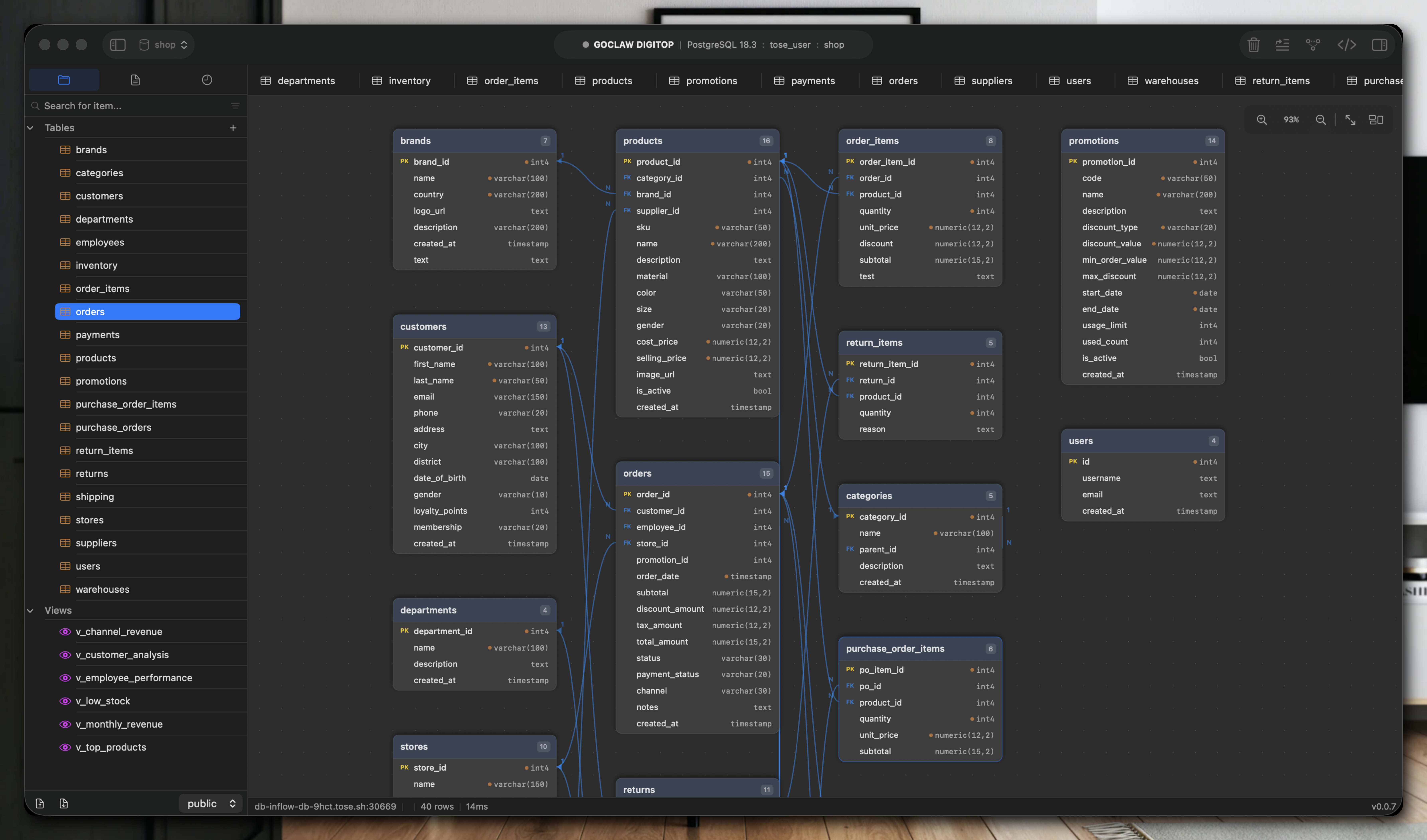
ER diagram, auto-laid out
Live schema rendered with CoreGraphics on macOS. Pan, zoom, fit-to-view. Click a column to jump to its table — no Graphviz, no separate import.
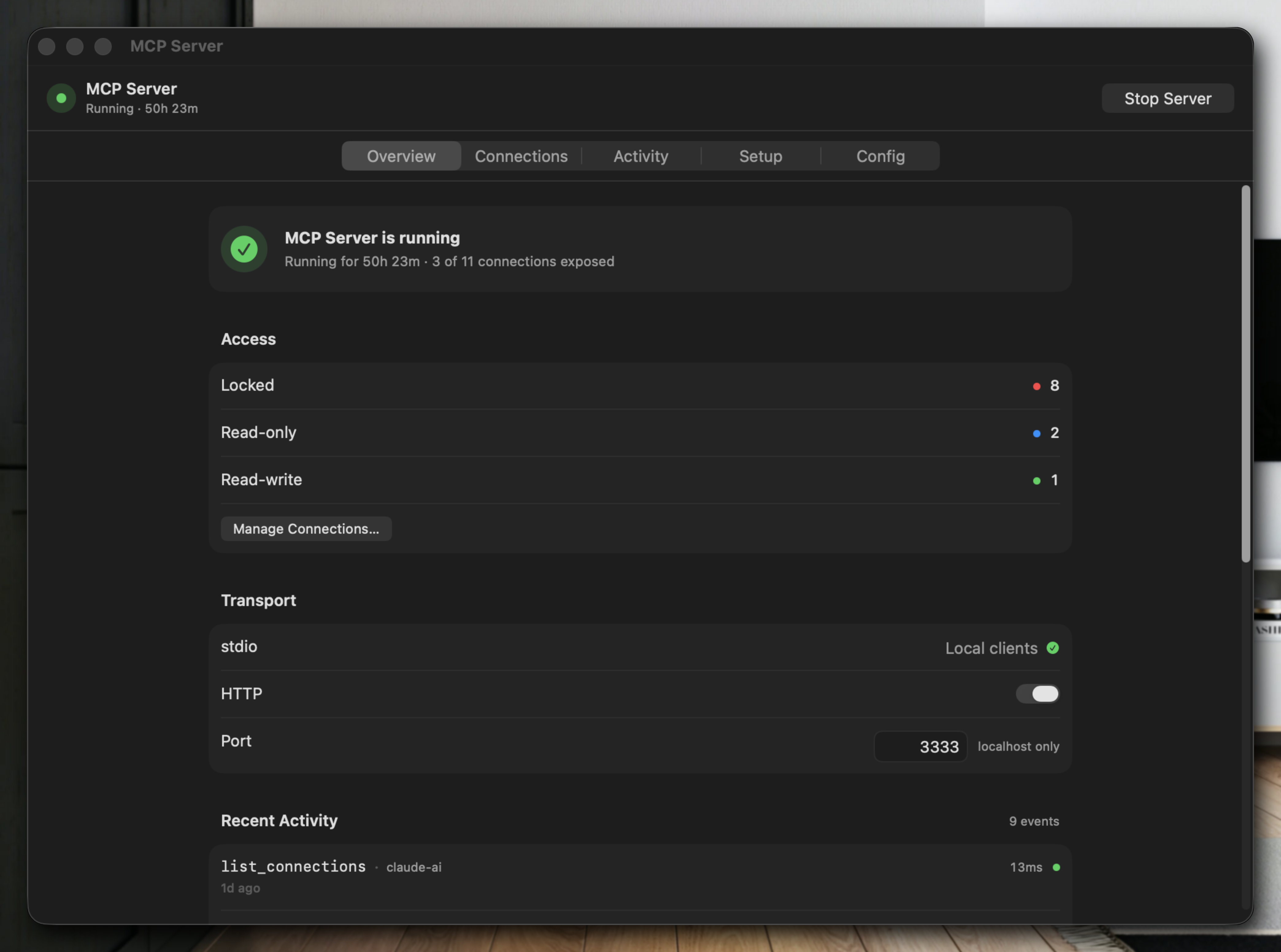
MCP server in two clicks
Expose any saved connection as an MCP endpoint for Claude Desktop, Cursor, or any MCP client. 13 tools across 3 permission tiers — read-only, read, or gated write.
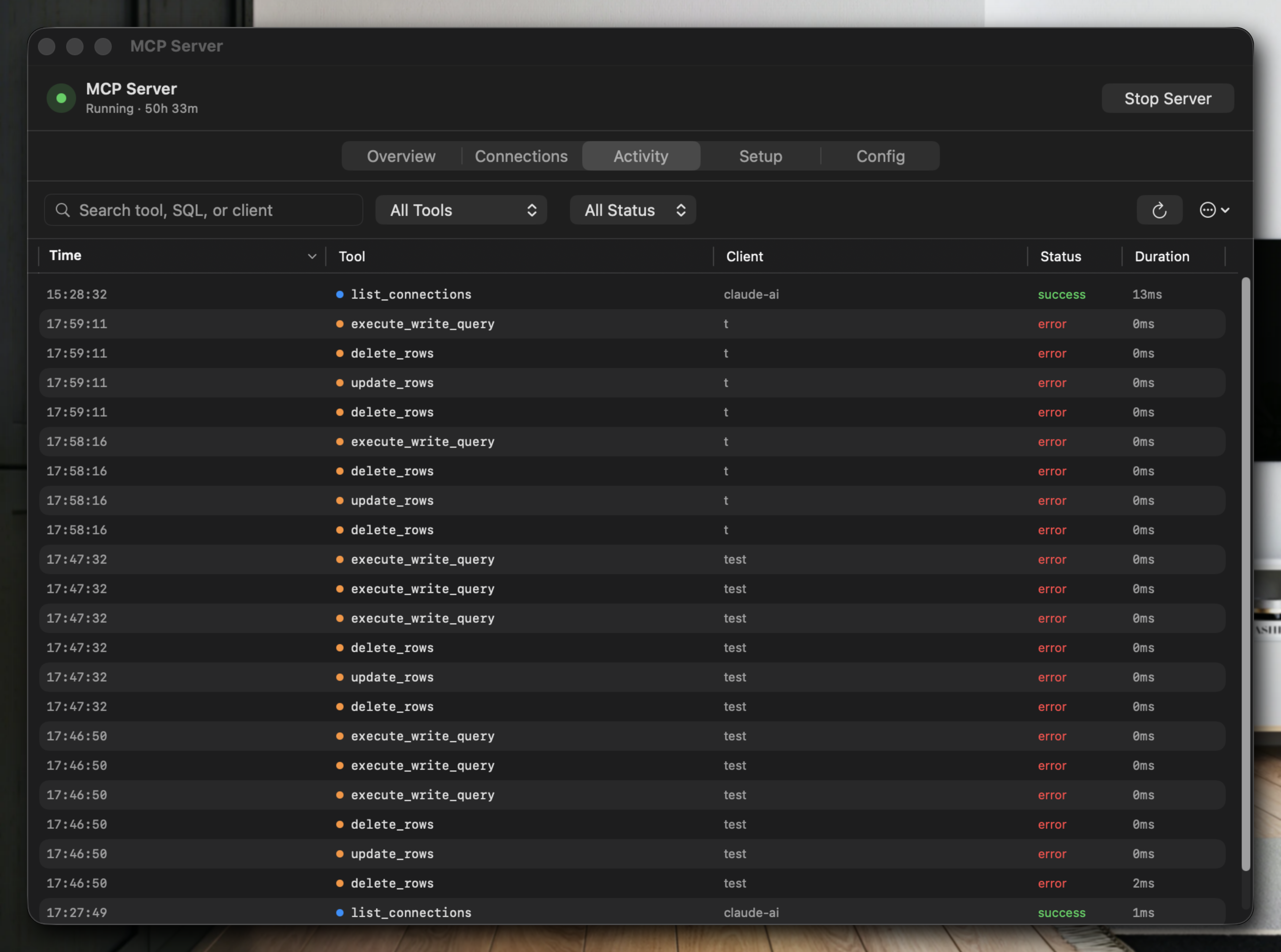
Audit every AI call
Every tool call lands in the activity log with tier, SQL, duration, row count, and approval state. Answer “what did the agent do last night?” without guessing.
Connect to all your databases
Native drivers for every engine you actually use — no ODBC, no JDBC, no Electron middle layer.
More engines on the roadmap — Cassandra, DynamoDB, Snowflake coming next.
Everything you need, nothing you don't
The full Gridex experience for solo developers: seven databases, AI chat, MCP server, and a native editor that feels instant. Every feature below ships in the free build — no trials, no paywalls.
AI Chat Built-in
Ask in plain English or Vietnamese. Gridex writes the SQL, runs it, and explains the result. Works with Claude, GPT, Gemini, and local Ollama — your choice of model, your API key.
Auto Schema Diagram
Zoomable ERD generated from live schema. Shows tables, columns, and foreign keys. Export as PNG or SVG for docs and reviews.
Query Editor
Multi-tab editor with autocomplete for schemas, tables, and columns. Syntax highlighting, inline errors, full query history, and one-click export to CSV, JSON, or SQL.
Table Editor
Edit rows like a spreadsheet. Inline cell editing, filtering, sorting, bulk updates, and a dedicated JSON document editor for MongoDB. Every change previewed before it writes.
SSH Tunnel
Reach production databases behind a bastion in seconds. Password or private-key auth, jump-host chains, and credentials stored in the platform keystore — Keychain on macOS, Credential Manager on Windows, libsecret on Linux. Never on disk.
Import & Export
Import CSV, JSON, or SQL dumps with column mapping and type detection. Export any query result or full table. One-click backup and restore per connection.
Built for teams running real databases
Enterprise-grade observability, automation, intelligence, and safety — without leaving the IDE or writing a line of ops code.
Realtime Connection Monitor
Live view of every active and idle connection, who holds which lock, what query is running, and how long it's been waiting. Catch leaks and contention before they page you.
Slow Query & Threat Log
Automatic tracking of slow queries, N+1 patterns, failed statements, and suspicious shapes that look like SQL injection. Filter, compare, and export for your on-call review.
Scheduled Jobs & Cron
Run queries, exports, health checks, and maintenance on a schedule. Chain steps, branch on results, and alert your team on failure.
Cross-Database Sync
Copy tables, queries, or whole schemas between any two connections — Postgres to MySQL, Mongo to Postgres, prod to staging. Preview the diff before it runs.
AI Mock Data Generator
Describe the rows you need. AI generates realistic, constraint-aware mock data that respects your schema, foreign keys, and enums. Seed thousands of rows in seconds.
MCP Server
Expose any connection as a standard MCP endpoint. Claude Desktop, Cursor, and any MCP-compatible agent can query your database safely — with read-only mode, per-table scopes, and an audit trail of every tool call.
Visual Query Builder
Drag tables and columns onto a canvas. Pick joins, filters, and aggregations. Review the generated SQL before it runs — no typing required.
Row Relationship Graph
Right-click any row to expand its entire graph. One click on an order reveals the user, the products, and every related record — visualized as a diagram, not a wall of JOINs.
Named Checkpoints
Backup and restore, evolved. Create titled snapshots before risky migrations, label them, compare them, and roll forward or back from one panel.
SQL Injection Detection
Static and runtime inspection of every query shape hitting your databases. Flag risky patterns, unsanitized inputs, and anomalous call sites before they become a breach.
Audit Log & Team RBAC
Every query, export, and connection attempt logged by user. Role-based permissions per database and per table. Compliance-ready trails for SOC 2 and internal review.
Why choose Gridex?
The only database IDE that ships AI, MCP, and team-grade tooling in one native app.
| Feature | Gridex | TablePlus | DBeaver |
|---|---|---|---|
| Native app (no Electron) | Java | ||
| macOS, Windows & Linux | |||
| AI Chat | |||
| Local AI (Ollama) | |||
| Multi-DB | |||
| Free tier | Limited | ||
| MCP Server | Pro | ||
| Realtime Connection Monitor | Pro | Limited | |
| Slow Query & Threat Log | Pro | ||
| Row Relationship Graph | Pro | ||
| Visual Query Builder | Pro | ||
| Scheduled Jobs & Cron | Pro | ||
| Cross-Database Sync | Pro | Limited | |
| AI Mock Data Generator | Pro | ||
| Named Checkpoints | Pro | ||
| Audit Log & Team RBAC | Pro |
Data last reviewed 2026 — competitors' features based on publicly documented releases.
Common questions about Gridex
Everything you need to know about the AI-native database IDE, the databases it supports, and how Pro works.
What is Gridex?
Gridex is a native database IDE for macOS, Windows, and Linux with built-in AI chat and an MCP (Model Context Protocol) server. It lets you query PostgreSQL, MySQL, SQLite, Redis, MongoDB, SQL Server, and ClickHouse in one fast, native app — and describe what you need in plain language to let AI write the SQL for you.
Is Gridex free?
Yes. The Gridex Community edition is free forever, with no account required and no usage limits. AI chat, multi-database connections, the query editor, SSH tunneling, and import/export are all included. A paid Pro tier is available for teams that need MCP server, team RBAC, audit logs, and enterprise-grade automation.
Which databases does Gridex support?
Gridex supports PostgreSQL, MySQL, SQLite, Redis, MongoDB, SQL Server, and ClickHouse today. ClickHouse is currently macOS-only; the other six are available on macOS, Windows, and Linux. More drivers are on the way. You can open multiple connections of different types side-by-side in the same window.
Does Gridex work with Claude, GPT, Gemini, and Ollama?
Yes. You can connect Gridex to Anthropic Claude, OpenAI GPT, Google Gemini, or a local Ollama instance using your own API key. Gridex never proxies prompts through its own servers — requests go directly from your machine to the model you configure, on macOS, Windows, and Linux.
What is the MCP server in Gridex?
MCP (Model Context Protocol) is the open standard that lets external AI agents — such as Claude Desktop, Cursor, and MCP-compatible IDEs — call tools safely. Gridex exposes any database connection as an MCP endpoint with 13 tools across 3 permission tiers (read metadata, read queries, and gated write mutations), a SQL sanitizer, row-count estimator, and a full audit trail. Available on macOS (stdio), Windows (stdio + HTTP), and Linux (stdio).
Is Gridex a TablePlus or DBeaver alternative?
Yes. Gridex is designed as a modern alternative to TablePlus, DBeaver, DataGrip, Beekeeper Studio, and HeidiSQL. Unlike most of them, Gridex is built natively on each platform — Swift/AppKit on macOS, WinUI 3 (C++) on Windows, Qt 6 (C++20) on Linux — not Electron or Java. It ships AI chat and MCP out of the box and supports local AI via Ollama for privacy-sensitive workflows.
Is my data and my credentials secure?
Database credentials are stored in the platform keystore — macOS Keychain, Windows Credential Manager, or libsecret on Linux — never in plain text on disk. SSH tunnels support password and private-key authentication with jump-host chains. The Community edition works fully offline; Pro features like the audit log and MCP server run locally unless you explicitly invite teammates.
Does Gridex support SSH tunneling and production databases?
Yes. Gridex has first-class SSH tunnel support with password or private-key authentication, multi-hop jump hosts, and Keychain-backed credential storage, so you can connect to production databases behind a bastion in seconds.
Is Gridex available for Windows and Linux?
Yes. Gridex ships first-class native builds for macOS (Apple Silicon and Intel, signed and notarized DMG), Windows 10 / 11 (64-bit, Velopack installer with delta updates), and Linux (x86_64 AppImage on Ubuntu 22.04+, Debian 12, Fedora 40, or any distro with Qt 6 ≥ 6.4). All three platforms get the same core feature set — AI chat, multi-database connections, SSH tunneling, and the full query and table editors.
How do I get Gridex Pro?
Pro is currently in early access. You can request access from the Pro section of this page, and we'll reach out when your seat is ready.
Still have questions? Email us →
Ready to try Gridex?
Free to download. No account required.
Available for macOS, Windows, and Linux.